This project has been created as part of the 42 curriculum by sfloresone and Pabloms63.
Description
A-Maze-Ing is a Python library designed to generate and solve both perfect and imperfect mazes using backtracking and search algorithms. A perfect maze is defined as one containing exactly one unique path between the entry and exit; imperfect mazes relax that constraint when you need something less strict.
The work is split into clear responsibilities instead of a single script that does everything. Generation builds the grid, pathfinding resolves it, the visualizer renders it, and file handling takes care of config and export — each part stays on its own.
This project demonstrates a modular architecture of:
- Maze Generation: with an extra feature (injection of a custom “42” pattern).
- Pathfinding: BFS (Breadth-First Search).
- Visualizer: Using ANSI and Unicode characters.
- File Handling: Exporting the results to files and parsing configuration inputs.
Backtracking drives maze generation; once the maze exists, BFS finds the shortest route from entry to exit.
Characteristics
- Modular generator: Creates mazes of any size with configurable entry and exit points — you define the bounds and where the walk starts and ends.
- 42 logo integration: Injects a custom “42” pattern if there is enough space (minimum 11×9 cells).
- BFS: Finds the shortest path between entry and exit after generation.
- Interactive Menu: Shows/Hides path, colour changing, regenerates maze — handy for trying different layouts without re-running from scratch.
- Export System: Saves the maze in a .txt file, including the solution path, so results survive beyond the terminal session.
Installation
Prerequisites
- Python 3.10+
- pip
[!WARNING] Important: I strongly recommend using virtual environments to avoid Makefile errors or permission errors.
Don’t know how to create one? Don’t worry…
Follow this steps in order to create one, it’s very easy:
-
- Open your terminal at the root of the project and write this
# 1.
python3 -m venv env-
- Activate the virtual environment
# 2.
source env/bin/activate-
- You’re ready to go
Project compilation, step-by-step
# 1. Install dependencies
make install

# Or manually install it:
python3 -m pip install -r requirements.txt
python3 -m pip install -e . --no-build-isolation
Use
Interactive mode
make runAnd voilà, there is your beautiful maze
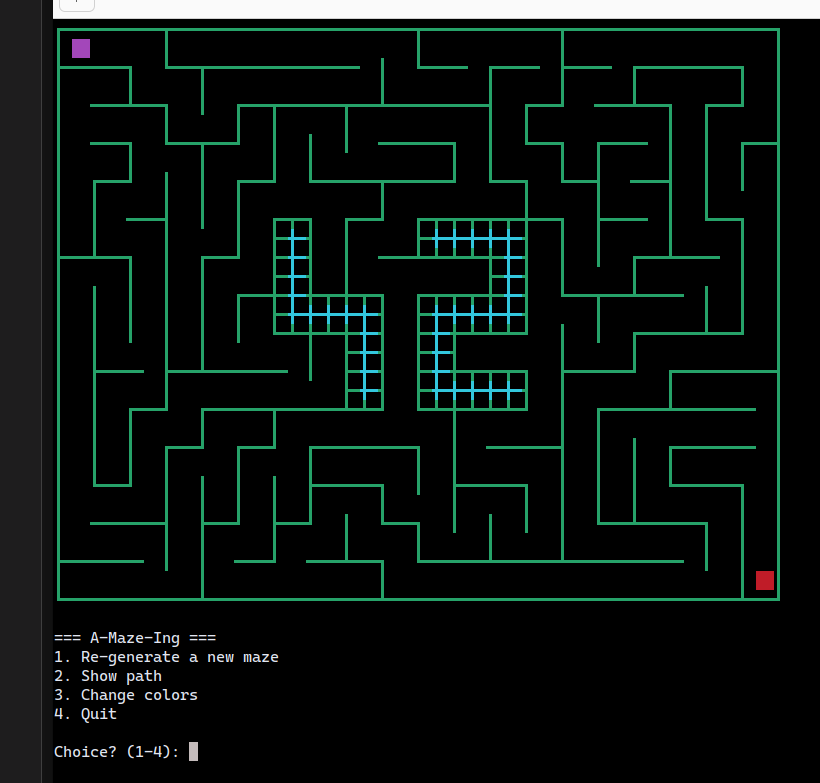
Interactive menu (Sorry it’s in Spanish) :
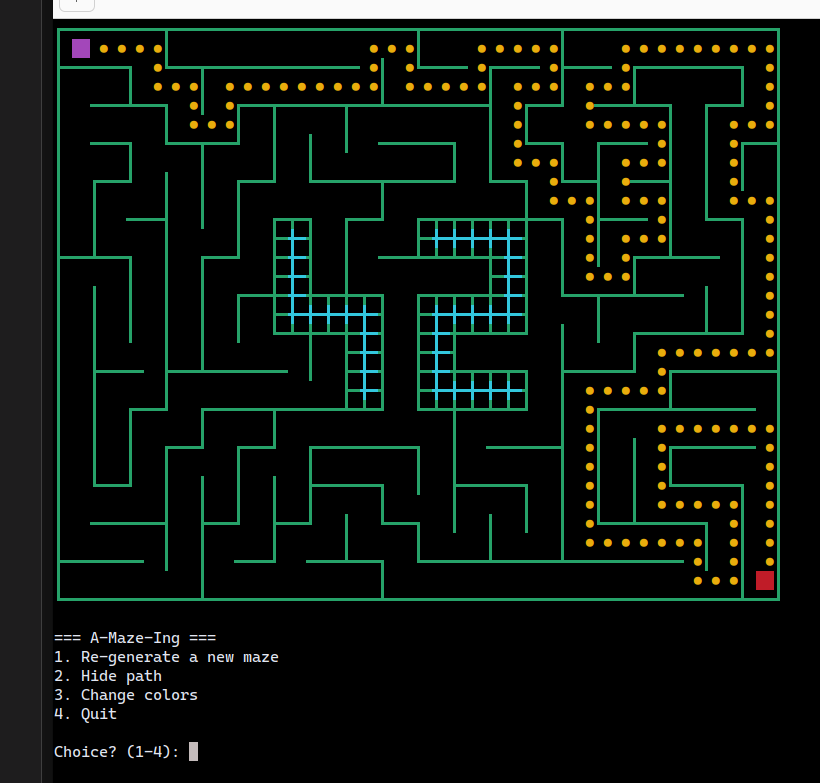
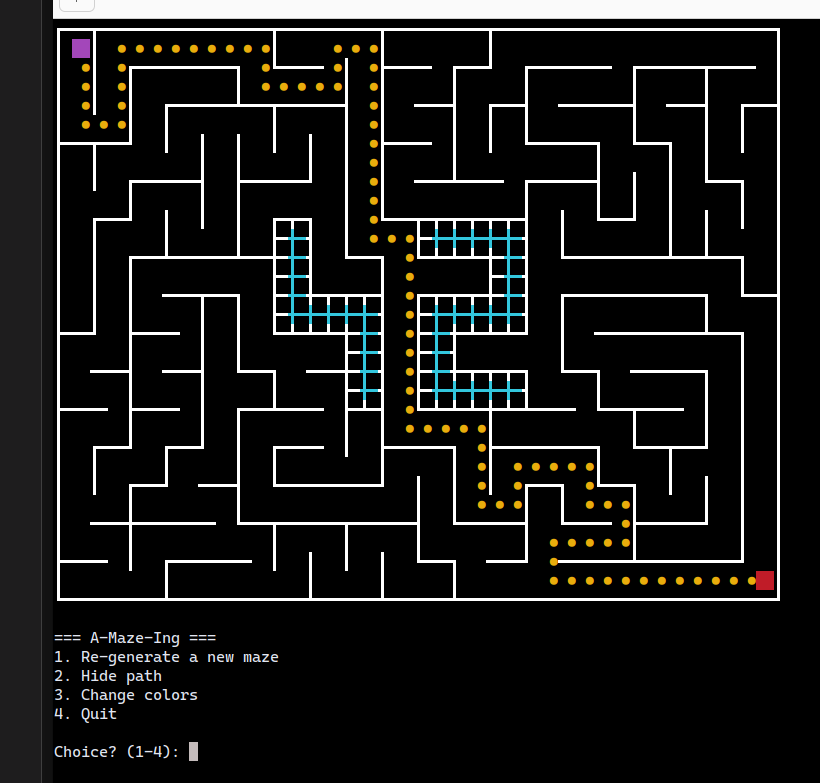
1- Generate new maze2- Shows/hides path3- Change walls colours4- Exit
Show path
Change colours
As a library
See test_package.py for an example.
The famous config file
File config.txt:
WIDTH=50
HEIGHT=50
ENTRY=1,3
EXIT=24,14
OUTPUT_FILE=output_maze.txt
PERFECT=True
Parameters:
WIDTH,HEIGHT: Maze dimensionsENTRY: Entry asx,yEXIT: Exit asx,yPERFECT:Truefor perfect mazes,Falseimperfect ones.OUTPUT_FILE: Output file path, only.txt
Project management
Team
- sfloresone: Initial development, project architecture and documentation
- Pabloms63: Optimization, visualizer and documentation
Quality management
# Clean generated
make clean      # Deletes __pycache__, dist/, .mypy_cache

# Build
make build      # Distribution with setuptools
Technical notes
-
Visualizer: ANSI colors (colores) and heavy Unicode (paredes gruesas)
- Cannot render in limited terminals or native Windows CMD — worth keeping in mind if you expect output everywhere.
-
“42” Logo: Requires min. 11×9 cells — below that, the pattern simply won’t fit.
-
Output format: Coordinates + Entry/Exit tuples + path (N/S/E/W) in plain text — readable without reopening the interactive session.
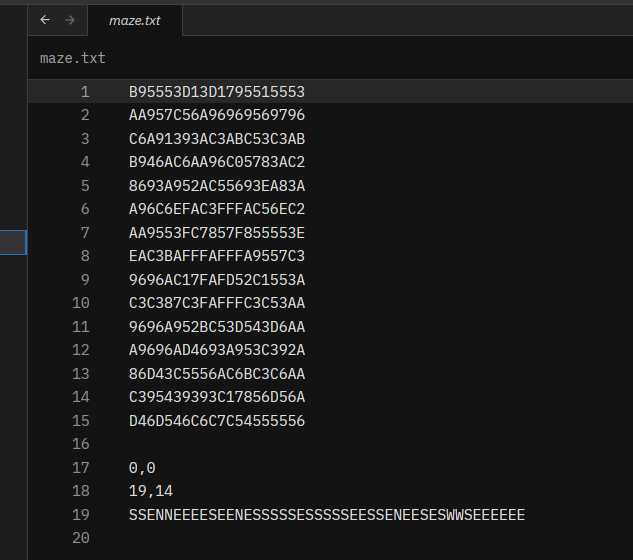
Also…
You can generate the maze using a reproducible seed
gen = MazeGenerator(20, 20, (0, 0), (19, 19), seed=42)
gen.generate_maze()
WIDTH=50
HEIGHT=50
ENTRY=1,3
EXIT=24,14
OUTPUT_FILE=output_maze.txt
PERFECT=True
SEED=42Passing the same seed yields the same layout — useful when you want to compare pathfinding or export behaviour on an identical maze.
Resources
-
Algorithms:
-
Internal documentation: Docstrings in each module